PWM Output on Raspberry Pi
By using PWM output, you can gradually change the brightness of the LED.
This page explains how to output PWM on Raspberry Pi.
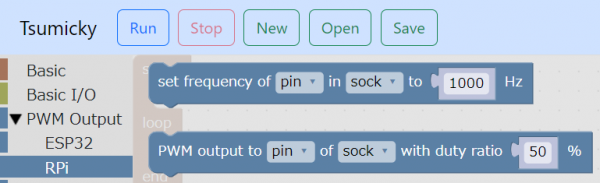
Raspberry Pi-based PWM output-related blocks are located in the "PWM output" - "RPi" group.
Frequency settings
First, set the PWM frequency for each pin in the "set frequency of ... in ... to ...Hz" block.

Before using this block, it is necessary to assign a pin to a variable in advance using the "Assign pin XX of XX to variable XX" block in the "Basic Input/Output" group.
Perform PWM output
Next, use the block "PWM output to ... of ... with duty ratio ...%" to perform PWM output.
Specify the duty ratio in the range of 0 to 100.

Example
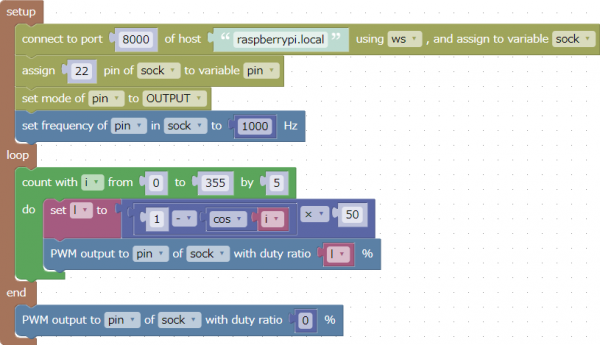
This is an example of PWM output to pin 22.
Increase or decrease the duty ratio between 0% and 100%.
If you connect an LED to pin 22, the LED will gradually become brighter and darker.
This program can be downloaded from here.